This page takes you from an empty Cargo project to a program that draws a frame and writes it to an image file you can open. Nothing here needs a GPU, a window or egui.
Add the crate#
cargo add dream-soft-renderIt needs Rust 1.92 or newer. Without features it has no dependencies at all. The egui adapter is
the egui feature; Hosting egui starts there.
Draw a frame#
use std::fs::File;
use std::io::{BufWriter, Write};

use dream_soft_render::{
    ClipRect, Color, Mesh, Rect, SoftwareRenderer, SoftwareSurface, Vertex,
};

fn main() -> Result<(), Box<dyn std::error::Error>> {
    let mut renderer = SoftwareRenderer::default();

    // A 2x2 checkerboard: premultiplied RGBA8, top row first.
    let checker = renderer.create_texture(
        2,
        2,
        &[
            255, 255, 255, 255, 0, 0, 0, 255, //
            0, 0, 0, 255, 255, 255, 255, 255,
        ],
    )?;

    let mut frame = renderer.begin_frame(160, 120)?;
    frame.clear(Color::from_rgb(17, 20, 28));
    frame.fill_rect(
        Rect::from_min_size([8.0, 8.0], [144.0, 24.0]),
        Color::from_rgba_unmultiplied(80, 160, 255, 192),
        ClipRect::ALL,
    )?;
    frame.textured_rect(
        Rect::from_min_size([8.0, 40.0], [32.0, 32.0]),
        Rect::FULL_UV,
        checker,
        Color::WHITE,
        ClipRect::ALL,
    )?;
    let amber = Color::from_rgb(240, 170, 40);
    frame.mesh(
        Mesh {
            vertices: &[
                Vertex::new([100.0, 40.0], [0.0, 0.0], amber),
                Vertex::new([150.0, 112.0], [0.0, 0.0], amber),
                Vertex::new([50.0, 112.0], [0.0, 0.0], amber),
            ],
            indices: &[0, 1, 2],
            texture: None,
        },
        ClipRect::ALL,
    )?;

    write_ppm(frame.surface(), "frame.ppm")?;
    Ok(())
}

/// A binary PPM: a short header, then RGB bytes. Most image viewers open it.
fn write_ppm(surface: &SoftwareSurface, path: &str) -> std::io::Result<()> {
    let mut file = BufWriter::new(File::create(path)?);
    write!(file, "P6\n{} {}\n255\n", surface.width, surface.height)?;
    for pixel in surface.pixels.chunks_exact(4) {
        file.write_all(&pixel[..3])?;
    }
    file.flush()
}
Run it and open frame.ppm. Shown here at twice its size:
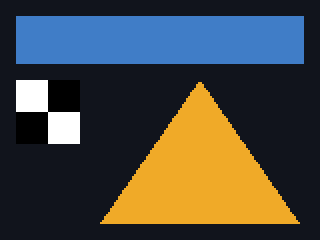
frame.ppm, scaled 2x with nearest-neighbor.What happened, in order:
create_texturestored the checkerboard and returned aTextureId, a handle you draw with.begin_frame(160, 120)sized the surface. A new surface starts transparent black; nothing is cleared for you after that.clearoverwrote every pixel with an opaque background.fill_rectblended a translucent rectangle over it.from_rgba_unmultipliedtook the color as you would write it in a color picker and premultiplied it, because every color the renderer stores is premultiplied.textured_rectstretched the texture over a 32x32 square, nearest-texel, so the checkerboard stays sharp.meshdrew one triangle from three vertices.
Each call drew its pixels before it returned. frame.surface().pixels is the result: 160 × 120 ×
4 bytes, red, green, blue and alpha per pixel, rows top to bottom. The PPM writer drops the alpha
byte, which is 255 everywhere here: the background is opaque, and blending always writes 255.
Next#
- The rules: which pixels a shape covers, and what the bytes mean.
- Drawing and Textures: the rest of the drawing API.
- Hosting egui, if you are here to draw an egui interface.
- Presenting frames: from the surface to a screen.