Mod Morrowind active
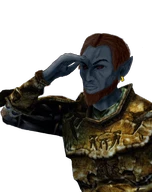 Hawk3ye
OpenMW Zooming, with high degrees of interoperability.
- Stable
- not released
- Development
- 0.521-dev.6
- Runs on
- OpenMW any version
- Package
- Single directory
Overview

Hawk3ye was inspired by Zoom To See. However, when eyeing it for my own personal setup, I found the mod was broken and wasn't really very satisfying overall. So, I refactored it for greater reliability and mod compatibility.
Two simple keybinds are added - Toggle Zoom and Hold Zoom. The recommended defaults are Z and Mouse Wheel Click, respectively. Zooming in uses a smooth, exponential curve to decrease/increase the camera FOV as needed.
If you just want to install the mod, read the Installation and Usage sections. For Lua scripters, view the table of contents for more details.
Usage
Warning! Hawk3ye needs just a bit of setup before it will work in your game. Make sure to hit the Escape key, go into Settings -> Scripts -> Hawk3ye, and set bindings for hold/toggle as needed. If you want, you can also set a fixed duration for the Zoom to reach its lowest FOV, and a target FOV when zooming.
Hawk3ye for Modders
Hawk3ye uses events to trigger zooming, and takes advantage of OpenMW's more advanced input features to allow greater compatibility/interoperability. There also is an interface provided to check zooming state and better inform eventHandlers listening for Hawk3ye's zoom event.
Events
Hawk3ye uses one core event to control zooming - Hawk3yeToggle. It is provided a single argument which is a ZoomType (enum available in Hawk3ye's interface). To interrupt or prevent zooming, register a handler for this event and return false from that function.
When T4rg3t5.esp is loaded before Hawk3ye.esp, Hawk3ye also listens for T4rg3t5's S3TargetLockOnto notification. An active zoom is suspended while T4rg3t5 owns a target lock and resumes after the lock clears. Keep T4rg3t5 earlier in the content-file load order to enable this integration.
ZoomType Specification
--- Used for determining what kind of state change occurred. This enum can also be re-used
--- When emitting your own Hawk3yeToggle events.
---@enum ZoomType
local ZoomState = {
    RESET = 1,
    DISABLE = 2,
    ENABLE = 3,
}
Interface
Hawk3ye also offers an interface in Player scope, I.Hawk3ye.
The various fields available are as follows:
---@return boolean isZoomed Whether or not the zoom action is currently engaged. It cannot be overridden
isZoomed = function()
   return zoomActive
end,

---@return boolean whether or not the player is allowed to zoom. Any menu being open prevents zoom, in addition to the world being paused.
CanZoom = canZoom,

--- A read-only copy of the ZoomType enum for use in eventHandlers
---@type ZoomType
ZoomStates = ReadOnlyStates,
Settings
Hawk3ye's main settings group is a Player scoped storage section called SettingsHawk3ye. It contains the following keys and values:
1.enabled - Checkbox - Whether to use the mod's functions at all.
1.zoom_fov_degrees - Number - Target FOV when zooming. The maximum value is always 1 less than the FOV configured in the settings menu. Default is 42.
1.zoom_time - Number - Actual duration of the zoom effect from start to finish. Up to 2.5, default 0.75.
1.Hawk3yeToggle - inputBinding - Button/key used to toggle zoom. Suggested default is Z.
1.Hawk3yeHold - inputBinding - Button/key used to hold zoom. Suggested default is Mouse Wheel.
Credits
- All code in this repository was generated by Dave Corley under the GPL3 License.
- Please enjoy my content, hack away as you please, and respect the freedoms of your fellow creators in the meantime.
Install
Single directory · 0.521-dev.6
OpenMW, by handextract, then add these lines to openmw.cfg
- Extract the archive to a folder of its own, for example
C:/Games/OpenMW-Mods/Hawk3ye. - Add the lines below to
openmw.cfg. Keep them after thedata=lines of anything this mod depends on. - Open the launcher and check the load order. Content files load in the order listed here.
data="C:/Games/OpenMW-Mods/Hawk3ye"
content=Hawk3ye.esp
Replace the folder with wherever you extracted the archive.
DreamWeave clientsCHIMERA and other tools that read the manifest
Give the tool this page's address, or the manifest directly. It finds the release for its channel, checks compatibility and dependencies, downloads from any listed source and refuses bytes whose SHA-256 does not match.
- Project id
- ac37d9df-e920-46fd-9cdf-db16c96338e0
- Manifest
- https://dreamweave-mp.github.io/S3ctors-S3cret-St4sh/dreamweave/projects/ac37d9df-e920-46fd-9cdf-db16c96338e0.json
What is in the archive
- hawk3ye.zip
- Hawk3ye.espand the rest of the data directory
- hawk3ye-Documentation/this page and its docs, readable offline
- hawk3ye-dwmod.tomlthe project's mod.toml
- dreamweave.release.jsonwhat this archive is, for tools
Compatibility
Anything not listed here is untested.
Runs on
- OpenMWany version
Releases
-
0.52 stable unverified
-
0.51 stable unverified
-
0.5 stable unverified
Discussion
GitHub Discussions · sign in with GitHub to join in